Showing posts with label scrapbooking. Show all posts

Thursday, February 4, 2016

Photoshop and Brushes

Hello scrappers!

I thought I would talk about brushes today. Brushes and/or stamps are the fundamental elements that are used for digital scrapbooking! Photoshop lets you manipulate brushes in so many different ways, actually too many for me to list here today.  I love to make brushes to go with my kits and, when I was scrapping more, I would go out prowling in my favorite shops for new brushes on a regular, almost daily, basis! Brushes can be used in most, if not all, of the digital photo enhancement software programs today. If you do not have access to brushes or cannot use Photoshop brush files (.abr) you can always use .png files which are considered 'digital stamps.'

The advantages of being able to use the .abr files over the .png files are numerous but the most notable advantage is that you can resize a brush smaller or larger and it does not lose its crisp edges or distort in any way. The .png files can usually be reduced in size but when you enlarge them, most of the time, you end up with an inferior element.

I use brushes to make background papers too.  You can repeat a brush or stamp on a layer above a solid or print layer, add a style (or not) and end up with a beautiful background. Try reducing the opacity of the brushes layer and/or the blending option for the layer, the possibilities are almost endless!

When I make a brush for a challenge in the ScrapBird forum, I always include the .png file format for the brush so anyone can join in on the challenge. So it makes no difference which software program you use to create with, you can always join my challenges!

Here are a few of this month's Brush On! Challenge entries for you to see how the brush was used in three different ways.

In the first layout, smikeel, used the brush as a template and clipped the brush layer to a paper layer to get the multi-colored and textured look for her awesome page,  A Rose:


Kim, smikeel, also used one of my templates,  For The Love, and my kit Bright Love; all available at ScrapBird.

In the next layout, by twizzle, you can see she resized the brush and duplicated (also mirrored) it several times to make a border treatment for her photo grouping in her outstanding page, Brothers:


 Chris, twizzle, used my kit Afternoon Delight to make her page; it is also available at ScrapBird.

In the third layout, by betsyfru, she recolored the brush and added glitter to the edges and added it as a part of her cluster focal point, to her cheerful and bright page, Candy Love:


Betsy, betsyfru, also use my new kit Bright Love for her page.

When I make a brush for a challenge in the ScrapBird forum, I always include the .png file format for the brush so anyone can join in on the challenge. So it makes no difference which software program you use to create with, you can always join in the fun!

Please drop by the ScrapBird forum and get your free February Brush On! Challenge brush and make your brush masterpiece to share with us!

So I hope these tips and layouts shed some light on the use of brushes and encourage you to include more of them in your scrapbooking layouts! 

Thanks for dropping by and come back soon!


Saturday, January 30, 2016

An Invitation To Fun!


Hello Scrapbookers!  

How are you? Do you have the seasonal doldrums and need something to spark your creativity or just to keep you awake? LOL! Will you come and join me and others in the ScrapBird forum for camaraderie, scrapbooking information, tutorials, games, and challenges? 

Free Products

We want to welcome you and encourage you to join in and receive free products just for registering in the forum!

Here is the kit you get just for registering in our ScrapBird Forum:


Here is the kit you get by posting 30 times:


Scrapbooking Challenges

Don't know what a scrapbook challenge is? Don't be shy, as none of us knew what they were until we familiarized ourselves with the scrapbooking sites! Scrapbooking challenges are a giant array of scrapbooking projects to participate in from Brush Challenges to Progressive Scraps!  At ScrapBird each challenge is listed in the forum index and you can find all the instructions and help you need right in the thread (topic/subject) you are interested in. 

My Current ScrapBird Challenges
    
    Brush Challenge:  For my brush challenge, I will give you a free .abr (Photoshop file) or .png (other generic digital programs) brush/digital stamp and you make a layout, greeting card, desktop, or artist trading card (ATC) using my brush and my products!  You then post your finished project, in reduced pixels, in your personal ScrapBird Gallery Album and in the thread (topic/subject) you made it for. I not only give you the free brush, you also get a Loyalty Stamp for participating in the challenge: get 6 to 8 stamps a month and trade them in for free products of your choice! A real Win Win situation!

Here is the free brush/digital stamp I'm giving away this month: 


  You can use this link to go to February’s Brush Challenge:  http://forum.scrapbird.com/viewtopic.php?f=245&t=42357

    Desktop Challenge:  For my desktop challenge, I design and give you a desktop template (blueprint for a personal layout you use on your computer's monitor) that you use to make yourself a pretty and colorful monitor desktop! So, you get the template for free and I also give you a Loyalty Stamp for this challenge to go with your monthly collection! 

Here is February’s free desktop template:


Use this link to go to February’s Desktop Challenge: http://forum.scrapbird.com/viewtopic.php?f=240&t=42356

Not Familiar with Forums?

Don't worry about registering in the Forum or for a Gallery Album, we have all the instructions you will ever need right in the forum, in plain English! If you should have a question, speak up! We'd love to answer and talk with you either in the forum or via PM (Private Message) in our forum. Questions are always welcome because your question could lead us all into a new technique or thought pattern!

Special Forum Links

ScrapBird Forum:  http://forum.scrapbird.com
ScrapBird Gallery:  http://gallery.scrapbird.com/
Gallery and Forum Guidelines and Instructions:  http://forum.scrapbird.com/viewtopic.php?f=133&t=40685
Country Liv’s Challenges:  http://forum.scrapbird.com/viewforum.php?f=208
Creative Team Challenges and Information:   http://forum.scrapbird.com/viewforum.php?f=160
ScrapBird Store:  http://scrapbird.com/
CLGraphics Shop in the ScrapBird Store:  http://scrapbird.com/country-livs-graphics-m-179.html

Sunday, December 15, 2013

Sunday Blog Gift Time!

Hello y'all,

How was your week? Mine has been cold and rainy. I certainly don't mind the cold but I do mind the constant rain. Ms Minnie doesn't like the rain at all, she absolutely refuses to go out in it even when I hold an umbrella over the silly little thing!

I have some new photos of my great grandson Jase and thought I'd share with you.  He really is cute and reminds me of his Aunt Tabitha much more than his daddy or mommy.


This Sunday's Blog Gift is a matching set of paper and journal card and they also match my new kit Sweets. Hope you like these and get the kit to go with them. This week's Newsletter Gift is another matching set so be sure and sign up and confirm your newsletter subscription. I feel really bad about a lot of folks who signed up but don't receive the newsletter simply because they didn't confirm the subscription-no confirmation-no newsletter that's the web rules.  Here are the previews of this weekend's gifts; just click the link under the Sunday Blog Gift preview to download your copy.


Here is the newsletter gift for tomorrow:


Hoping you will have an awesome week!


Don't forget to spay and neuter your pets and if you want a new family member remember to adopt NOT shop!

Wednesday, December 11, 2013

New Scrapbooking Page Kit

Hello scrapbooking fans!  I finally finished my 'Sweets' kit! I love the colors and the sweet rocking horses and the train and . . . well, let's just say I am really liking this one! (if you are looking for the blog train or the Sunday gift just scroll down the page)


 Hope you like this kit! It is available in all of my personal use stores.

Here are some beautiful layouts by Dawn and I will post Chris's when I get them!


Here is Chris's pretty layout!


Sunday, July 14, 2013

Happy Sunday!

Hello y'all,

How are you doing today? Drier than we have been I hope! It seems like it is never going to stop raining and causing the power and cable outages along with flooding and felled trees because the sodden ground cannot hold them upright! Rain is good, we all need rain and it helps cool those North Carolina temps down but enough! The fibro and arthritis are working overtime to sideline me along with the depression.

I haven't completed any new products this week, but I have been working on a special little boy kit that I hope to have completed this month or at least by the first of next month. I told you I have been depressed, well I am really getting disillusioned with designing; I have even thought about totally quitting and just reading and watching the telly for my retirement years. I have these thoughts more often lately and it makes me wonder if I am truly serious about it. 

Have you gotten tired of digital scrapping? Have you slowed down taking those family photos? Do you need a spark of imagination to get back in the groove? Tell me what you do to pull yourself out of the funks.

I have a blog gift for you today. There are four tags that can be used for journaling when you pair them with the journaling inserts. These are large enough to use as photo mats too. Hope you like this gift.  I have a similar gift for you in my newsletter this week so be sure you are signed up so that you can get the remainder of the tags. Here is the preview:


Did you see the new FaceBook Fan Freebie for this month? Click on the preview to go to CLG's Fan Page to get yours! 


I will go and start on the newsletter now.  If any of you have any sparks you'd like to share with me, to get me out of the funk, I would certainly love to hear them!

Come back soon!

Friday, October 5, 2012

Halloween Freebie!

Hey Y'all!

Hope everything is fine with y'all tonight/today/this morning! LOL! We are spread out all over the world aren't we?  Isn't the Internet amazing? Did you ever think you would be friends with people in countries other than your own? I wish I was younger, not because I was beautiful and talented (did I say beautiful), so that I could enjoy all this freedom to learn and investigate and communicate longer.  I love the Web! I don't think I have ever enjoyed anything as much as I have and am enjoying the Internet. I remember the first week we had a home computer and my roommate was dialing the telephone from it in order to go up to the Epson Bulletin Board to find out what was happening with other Epson users. We were the first of our friends and the first on our street to have a computer and we thought we were hot stuff :o) The first project I worked on was a security manual for the bank I worked for as their Security Manager.  I wrote the entire manual on that old Epson (it was new then of course) and printed it out on a dot matrix printer! We thought that was so amazing, that we could type and correct then print out on our own printer.  This was before every office had one of the 'line' correctable typewriters, you know the ones that let you back up by one line and correct a mistake before it printed on your paper!  Wow! I am going on my own personal memory trip! Anyway, you get my meaning: THE WORLD WIDE WEB IS WONDERFUL!

I promised that I would come back this week with a freebie for you and I finally got a chance to make good on my promise! I have made you a Halloween overlay to use over your paper of choice. Try different blending styles with it to get some really interesting papers to use in your scrapping. I love the little bats and glassy eyed frog! Here is the preview:


You can download this freebie from HERE or from HERE.

I am past due to send out a newsletter too and I have made a freebie for it also.  It is called Scary Jack because it is a Jack-O-Lantern sitting in the dark with two candles lit inside casting out some spooky light! I thought it would be a fun sign to have at your Halloween parties (you can get Costco to print it for you for as little as $1.49 for an 8x8 or $2.99 for 12 x 12)) or a cute clipart element to add to your Halloween scrapbook layouts.

Be sure and sign up for my newsletter (to your right on the side panel) if you haven't already so you can get your copy of Scary Jack!

Okay, I have a question for all you hybrid and altered art scrappers.  When you print out a digi-stamp to use in your project and you want to color it with color pens, chalks, watercolors, etc. what do you do to keep the inkjet inks from running  and smearing and ruining your project? A friend of mine is getting ready to market some gorgeous digi-stamps that are geared toward the paper and altered arts scrappers.  These artists don't print out their elements in color like we digi-scrappers do, they use them as if they had a stamp they pounced on an ink pad then color it in.  I know that there are fixatives for this but what do You use and what do you think is the best way to use it? If anyone comes up with a super good answer I am pretty sure I could talk my friend into giving you a Christmas digi-stamp to use on your projects! Just leave your answers in the comments section or email me at countryliv@yahoo.com with Digi-Stamp in the subject line.

I am sorry I have not been blogging as I should, this past month has been a doosey and looks like October is going to be going the same way! I have been blessed with a design assistant by the name of Chris Allport who has turned into one of the greatest finds a designer could hope for; she is knowledgeable, quick, prolific,has an ace photog as a husband, and is indispensable! It will be because of her if I get back here again this month!

Oh, one more thing: The new design store I was joining this month has had a small set back but Bella Zingaro Studio will be up and running by November 1, this year! So keep your ears tuned for the Grand Opening which promises to be a fun time!

Y'all take care now!


Thursday, June 21, 2012

New Kit Soon Available!

Hello Y'all,
Just stopping by to let you know about my new kit 'Soft Spring' and a freebie available to my newsletter subscribers. Sign up for my newsletter (directly to your right in the sidebar) and never miss a freebie of mine! If you sign up within this week I will resend this week's newsletter to you so you may have the freebie quickpage.  My new kit:


I'm also announcing a new layout form I am calling ‘Great Starts!’  These pages are less than quickpages but more than frame clusters; they are not layout templates.  These forms have openings for your photos, like quickpages, but also have room for your personalization with flowers, buttons, bows, journal cards, titles, or any number of elements that would suit your taste.  Sometimes you add a background paper or two and sometimes the background is included in the design.  They enable you to decorate them a little or a lot and should adapt to whatever your designing style might be.  I hope you enjoy using this new type of scrapbooking helper!
The freebie that is available to my newsletter subscribers is also made from my Soft Spring kit:

On a personal note: I have not been all that well (did I tell you it was discovered that I had a heart attack last year?) and have fallen way behind in my correspondence and phone calls and I truly sorry about it.  I have been having checkups, tests, and more tests that are suppose to be supporting good health but sometimes the tests seem to be hazardous to my health! For example: The colonoscopy and endoscopy. If you don't know what they are use Google.  If you do know what they are I'm sorry for you! Yes, I realize that we have to do some very distasteful and uncomfortable things but it has taken me a solid week to get over this one test! I was in a hurry to get all my checkups, including the dentist, behind me before this weekend because my darling grand daughter, Tabitha, was coming to visit us for a week or so and I didn't want anything hanging over my head that would keep me from enjoying her. Surprise! She isn't coming :(  She doesn't want to leave her boyfriend.  I knew this day would come but up until yesterday I thought she would be down this year. Today, actually yesterday, is her 18th birthday! Happy Birthday Baby!
My other grand daughter, Suzanne, graduated from high school this past week! We are all really proud that she went back and finished at the top of her class after having her baby, Gavin, who just this month turned 1!
My grandson, Joshua, has done super good in school this entire year and he was presented with two merit awards, one in science and one in math! He is such a little fellow that we were afraid he was going to be the subject of bullys, but since he is such a jock and an all around nice guy he has, knock wood, been spared.
Well, if I am going to get this new kit in my shops I need to shut up and get moving! Thanks for stopping by!
Hugs,
Liv

Wednesday, April 27, 2011

Take a look!

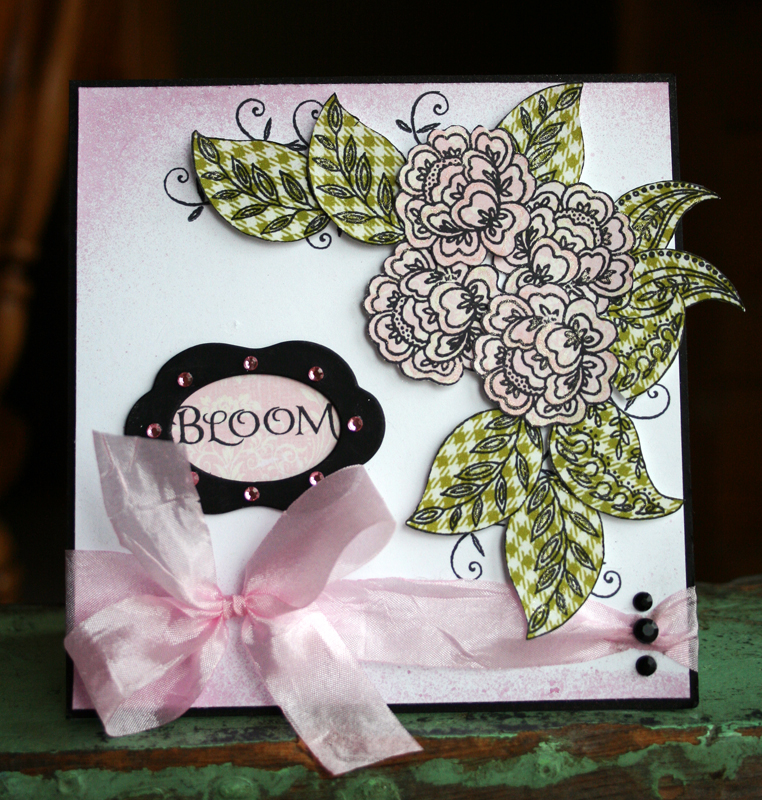
I just had to share this beautiful card that my friend Vicki C had on her blog the other day (the image should be 'clickable' for a close up).  She is a paper scrapper and does such a lovely job that sometimes she makes me forget my arthritic hands and do some paper work. Sigh . . . she rocks!


Be sure and check out her Blog 'This Art That Makes Me Happy'

I will have some good news for you soon (maybe good news for me and not you?) . . . something is going right for me and I will share as soon as I can!

Hugs!

Friday, April 22, 2011

Summertime Digital Kit

Hey Y'all!

Well, I finally finished the Summertime kit.  I got the bright idea of adding bubbles and for some reason the technique eluded me!  But I got them and it is all ready for you to download.  This is the first kit I have made in two years; I have made some elements and word art but not an entire kit.  I love the color pallet so much and will probably use it again for some add-ons and such.


Sorry, this kit is no longer available :(  Please watch for a revamped kit in my store!

Monday, April 4, 2011

Another Free Doodle Gift

Hi Y'all!

Hope you've been having a super weekend.  The weather here in North Carolina was totally awesome today with lots of sunshine and warm temps!  Yesterday I went to Concord to watch my grandson, Joshua, play his first baseball game of the season and it was so windy and cool up there that I had on a quilted vest and a coat! The weird thing is that Concord is only 45 minutes away from my house.  I still enjoyed watching that little fellow play; he is such a 'hot dogger' at any ball game but especially baseball which is his greatest love.  He plays in the catcher position and does it with such style and precision for an eleven year old that it is amazing!  I forgot my camera so Kim took one photo with her cell for me-now if she can just figure out how to download it to her PC and email it to me :)

The doodles I made this time are for borders and corners and can be used for layout pages or frames on those pages or even on your hybrid digital projects.  I colored most of those on the preview so that you could get an idea of how they can look if you want to color them.  I colored mine by making a blank layer above the doodle I wanted to color and used either a solid brush or a gradient to color where I wanted to (it helps to temporarily lesson the fill percentage so you can see the doodled through the colors). I then hovered my cursor between the two layers and Alt clicked to make a clipping mask after which I then applied the mask if I liked the results. I know this works in PS CS and up but I am not real sure about how to go about it in PSE though I know it can be done!  The doodles are in .psd and .png so you may use them in most scrapbooking software.  This preview is clickable so that you may get a closer look.


The link for:  4shared                    The link for:  MediaFire


Enjoy and check back with me soon for more freebies!


Hugs!

Thursday, January 20, 2011

Part 2 of my Christmas gift to you

Hello folks.  Just dropping by to post the links for the months of July and August 2011 calendar Freebie.  For those of you who do not have January through June please see the previous post for the links. I hope to finish up with the remainder of 2011 soon.


MediaFire - click this: 
http://www.mediafire.com/?g6h5wrlcfbciz0l

Hope all is well with you; I am doing pretty good though I am so busy that I haven't even had time to talk on the phone with my friends and family!  That's a 'good thing' since staying busy is suppose to add to your longevity!

Hugs,
Liv